<?xml version="1.0" encoding="utf-8"?><feed xmlns="http://www.w3.org/2005/Atom" ><generator uri="https://jekyllrb.com/" version="3.10.0">Jekyll</generator><link href="https://raphaelbucher.ch/feed.xml" rel="self" type="application/atom+xml" /><link href="https://raphaelbucher.ch/" rel="alternate" type="text/html" /><updated>2026-01-09T10:53:07+00:00</updated><id>https://raphaelbucher.ch/feed.xml</id><title type="html">X++ Blog</title><subtitle>Blog about DFO X++/C# programming</subtitle><author><name>Raphael Bucher</name></author><entry><title type="html">Programmatic Trace Parsing in X++</title><link href="https://raphaelbucher.ch/2025/12/31/programmatic-trace-parsing-in-xpp.html" rel="alternate" type="text/html" title="Programmatic Trace Parsing in X++" /><published>2025-12-31T00:00:00+00:00</published><updated>2025-12-31T00:00:00+00:00</updated><id>https://raphaelbucher.ch/2025/12/31/programmatic-trace-parsing-in-xpp</id><content type="html" xml:base="https://raphaelbucher.ch/2025/12/31/programmatic-trace-parsing-in-xpp.html"><![CDATA[<p>Debugging performance issues or verifying complex execution flows often requires the Trace Parser tool. However, manually recording traces, exporting ETL files, and opening them in the external Trace Parser application can be tedious—especially if you want to automate checks or log execution paths directly within code.</p>

<p>In this post, we explore how to build a <strong>Custom Trace Parser</strong> directly in X++. By leveraging the standard <code>Microsoft.Dynamics.AX.Services.Tracing.TraceParser</code> libraries (the same ones used by the “Troubleshoot” app in the standard application), we can start, stop, and parse traces entirely via code.</p>

<h3 id="the-challenge">The Challenge</h3>

<p>The standard Trace Parser is a powerful GUI tool, but accessing that data programmatically is difficult. The event definitions are often internal, and mapping SQL bind variables to their statements requires complex logic.</p>

<p>However, the D365FO environment includes the necessary DLLs to handle this. Specifically, we can utilize:</p>
<ul>
  <li><code>Microsoft.Dynamics.AX.Services.Tracing.TraceParser.dll</code> (Referenced in ApplicationSuite)</li>
  <li><code>Microsoft.Dynamics.AX.Services.Tracing.Crimson.dll</code> (Referenced in AppTroubleshooting)</li>
</ul>

<h3 id="the-solution">The Solution</h3>

<p>We can create a wrapper class that implements <code>System.IDisposable</code>. This allows us to use a <code>using</code> block to automatically start a trace and ensure it stops and cleans up the ETL file when execution finishes.</p>

<p>The core components of this solution are:</p>
<ol>
  <li><strong>SysTraceController</strong>: To start and stop the session tracing.</li>
  <li><strong>EventTraceWatcher</strong>: To read the generated ETL file.</li>
  <li><strong>SqlFormatter</strong>: To inject bind variables back into the SQL statements for readability.</li>
</ol>

<h3 id="the-implementation">The Implementation</h3>

<p>Below is a custom class, <code>SysTraceParser_BET</code>, that handles the orchestration. Note that we have to define some <code>EventId</code> constants manually (like <code>24500</code> for Method Enter) because the original enum is not accessible by X++.</p>

<pre><code class="language-xpp">using Microsoft.Dynamics.AX.Services.Tracing.TraceParser;
using Microsoft.Dynamics.AX.Services.Tracing.TraceParser.DataServices;
using Microsoft.Dynamics.AX.Services.Tracing.TraceParser.TraceEvents;
using Microsoft.Dynamics.AX.Services.Tracing.Crimson;
using Microsoft.Dynamics.AX.Services.Tracing.TraceParser.Presentation;
using System.Diagnostics.Eventing.Reader;

final internal class SysTraceParser_BET implements System.IDisposable
{
    // EventId values are set in enum Microsoft.Dynamics.AX.Services.Tracing.TraceParser.TraceEvents.MicrosoftDynamicsAXExecutionTracesFactory+RainierXppEventDescriptors
    // these are not accessible directly in x++, so we define them here again

    // SQL
    private const str PropertySqlStatement = 'sqlStatement';
    private const str PropertySqlBindVarValue = 'parameterValue';
    private const str PropertySqlColumnId = 'sqlColumnId';
    private const str PropertyExecutionTimeSeconds = 'executionTimeSeconds'; // New constant
    private const int AosSqlStatementExecutionLatency = 4922;
    private const int AosSqlStatementInputBind = 4923;

    // XPP
    private const str PropertyMethodName = 'methodName';
    private const int XppMethodEnter = 24500;
    private const int XppMethodExit = 24501;    

    private static TraceParserOrchestrator traceParserOrchestrator = new TraceParserOrchestrator();

    private str traceName;
    private SysTraceParserTable_BET traceParserTable;
    private boolean persistLog;

    private int traceId;
    private boolean imported;
    private boolean isRunning;
    private Filename etlFileName;
    private BindVariables BindParameters = new BindVariables();
    private Map sqlStatements = new Map(Types::Integer, Types::String);
    private Map sqlStatementsWithValues = new Map(Types::Integer, Types::String);

    private int stackDepth = 0;
    
    private SysTraceParserCallTreeNode_BET rootNode, currentNode;

    private void init()
    {
        rootNode = new SysTraceParserCallTreeNode_BET(SysTraceParserCallTreeNodeType_BET::Xpp);
        rootNode.IsRootNode = true;

        currentNode = rootNode;
    }

    internal void startTrace(boolean _persistLog = false)
    {
        System.Exception exception;
        try
        {
            if (_persistLog &amp;&amp; !traceParserTable)
            {
                traceParserTable = SysTraceParserTable_BET::create(traceName, SysTraceMarkerType_BEC::ThreadId, guid2Str(getCurrentThreadActivityId()));
            }

            SysTraceParserTable_BET::start(traceParserTable);            

            TraceParserOrchestrator::StartTraceOptimized(traceName);
            isRunning = true;            
        }
        catch(exception)
        {
            error(exception.get_Message());
        }

        if (isRunning)
        {
            this.awaitTraceParser();
        }
    }

    internal void stopTrace()
    {
        if (!isRunning)
        {
            return;
        }

        this.awaitTraceParser();

        System.Exception exception;
        try
        {
            TraceParserOrchestrator::StopTrace(traceName);
            isRunning = false;
        }
        catch(exception)
        {
            error(exception.get_Message());
        }

        if (!isRunning)
        {
            etlFileName = traceParserOrchestrator.GetEtlFilePath(traceName);

            SysTraceParserTable_BET::stop(traceParserTable, etlFileName);
        }
    }

    private void parseEtlRow(System.Object _sender, EventArrivedEventArgs _e)
    {
        var factory = AxTraceEventFactory::GetFactory(_e.Header.ProviderId);
        if (factory == null)
        {
            return;
        }

        if(!AxTraceEventFactory::IsDynamicsProvider(_e.Header.ProviderId))
        {
            return;
        }
        
        AxTraceEvent traceEvent = factory.Create(_e); 
        
        if (traceParserTable &amp;&amp; traceParserTable.MarkerType == SysTraceMarkerType_BEC::ThreadId)
        {
            if (guid2Str(traceEvent.ActivityId) != traceParserTable.MarkerName)
            {
                return;
            }
        }
        // if user selected, traceEvent.SessionName contains user guid
        // also check if is batch or user?
        // if (...)
        else if (traceEvent.ActivityId != getCurrentThreadActivityId())
        {
            return;
        }        

        var bindValues = BindParameters.Values;

        Microsoft.Dynamics.AX.Services.Tracing.Crimson.EventHeader header = _e.Header;
        int64 currentTicks = header.TimeStamp; 

        switch (traceEvent.EventId)
        {
            case XppMethodEnter:
                str method = 'Unknown';
                if (_e.Properties.ContainsKey(PropertyMethodName))
                {
                    method = _e.Properties.Get_Item(PropertyMethodName).ToString();
                }

                SysTraceParserCallTreeNode_BET xppNode = new SysTraceParserCallTreeNode_BET(SysTraceParserCallTreeNodeType_BET::Xpp, currentNode);
                xppNode.StartTicks = currentTicks;
                xppNode.ExecutionLog = method;
                xppNode.StackDepth = stackDepth;

                currentNode.addChild(xppNode);

                currentNode = xppNode;
                
                stackDepth++;
                break;

            case XppMethodExit:
                if (currentNode != null &amp;&amp; currentNode != rootNode)
                {
                    currentNode.DurationMs = (currentTicks - currentNode.StartTicks) / 10000;

                    currentNode = currentNode.Parent;

                    stackDepth--;
                    if (stackDepth &lt; 0)
                    {
                        stackDepth = 0;
                    }
                }
                break;

            case AosSqlStatementExecutionLatency:
                if (_e.Properties.ContainsKey(PropertySqlStatement))
                {
                    str sqlStatement = _e.Properties.Get_Item(PropertySqlStatement);
                    str sqlStatementWithValues = SqlFormatter::BindParameters(sqlStatement, bindValues.Values);
                    sqlStatements.add(sqlStatements.elements(), sqlStatement);
                    sqlStatementsWithValues.add(sqlStatementsWithValues.elements(), sqlStatementWithValues);

                    real sqlDurationMs = 0;
                    if (_e.Properties.ContainsKey(PropertyExecutionTimeSeconds))
                    {
                        sqlDurationMs = any2Real(_e.Properties.Get_Item(PropertyExecutionTimeSeconds)) / 1000;
                    }

                    SysTraceParserCallTreeNode_BET sqlNode = new SysTraceParserCallTreeNode_BET(SysTraceParserCallTreeNodeType_BET::Sql, currentNode);
                    sqlNode.StartTicks = currentTicks;
                    sqlNode.ExecutionLog = sqlStatementWithValues;
                    sqlNode.DurationMs = sqlDurationMs;
                    sqlNode.StackDepth = stackDepth;
                    
                    currentNode.addChild(sqlNode);
                }
                bindValues.Clear();
                break;

            case AosSqlStatementInputBind:
                if (_e.Properties.ContainsKey(PropertySqlColumnId) &amp;&amp;
                    _e.Properties.ContainsKey(PropertySqlBindVarValue))
                {
                    int columnId = any2Int(_e.Properties.Get_Item(PropertySqlColumnId).ToString())-1;
                    str parameterValue = _e.Properties.Get_Item(PropertySqlBindVarValue);
                    if (bindValues.ContainsKey(columnId))
                    {
                        bindValues.Clear();
                    }
                    bindValues.Add(columnId, parameterValue);
                }
                break;
        }
    }

    internal void import()
    {
        if (isRunning)
        {
            this.stopTrace();
        }

        if (etlFileName)
        {            
            AxTraceEventFactory::PrepareProivdersMap();

            using (var watcher = new EventTraceWatcher())
            {
                watcher.EventArrived += eventhandler(this.parseEtlRow);
                try
                {
                    watcher.ProcessTrace(etlFileName);
                    imported = true;
                }
                finally
                {
                    watcher.EventArrived -= eventhandler(this.parseEtlRow);
                }
            }            
        }
    }

    private void awaitTraceParser()
    {
        infolog.yield();
        sleep(5000);
        infolog.yield();
    }

    internal Map sqlStatementsWithParameterValues()
    {
        return sqlStatementsWithValues;
    }

    internal Map sqlStatements()
    {
        if (!imported)
        {
            this.import();
        }
        
        return sqlStatements;
    }

    internal SysTraceParserCallTreeNode_BET getCallTreeRootNode()
    {
        if (!imported)
        {
            this.import();
        }
        return rootNode;
    }

    public void Dispose()
    {
        if (isRunning)
        {
            TraceParserOrchestrator::StopTrace(traceName);

            traceParserOrchestrator.Cleanup(traceName);
        }

        if (etlFileName &amp;&amp; System.IO.File::Exists(etlFileName))
        {
            traceParserOrchestrator.Cleanup(traceName);
        }
    }

    public void persistTraceParserTable()
    {
        if (!traceParserTable)
        {
            return;
        }

        SysTraceParserCallTreeNode_BET rootNodeLoc = this.getCallTreeRootNode();
        RecordInsertList rilLog = new RecordInsertList(tableNum(SysTraceParserLog_BET), true, true, true, true, true);

        this.persistNode(rootNodeLoc, rilLog);
        
        rilLog.insertDatabase();

    }

    private void persistNode(SysTraceParserCallTreeNode_BET _node, RecordInsertList _ril)
    {
        if (!_node.IsRootNode)
        {
            SysTraceParserLog_BET log;

            log.SysTraceParserTableRefRecId = traceParserTable.RecId;
            log.CallTreeNodeType = _node.NodeType;
            log.SysTraceTextDetails = _node.ExecutionLog;
            log.DurationMs = _node.DurationMs;

            _ril.add(log);
        }

        ListEnumerator it = _node.Children.getEnumerator();
        while (it.moveNext())
        {
            this.persistNode(it.current(), _ril);
        }
    }

    static internal SysTraceParser_BET newFromTraceName(str _traceName)
    {
        Debug::assert(_traceName != '');

        SysTraceParser_BET traceParser = new SysTraceParser_BET();
        traceParser.traceName = _traceName;

        traceParser.init();

        return traceParser;
    }

    static internal SysTraceParser_BET newFromTraceTable(SysTraceParserTable_BET _traceParserTable)
    {
        Debug::assert(_traceParserTable.TraceName != '');

        SysTraceParser_BET traceParser = new SysTraceParser_BET();

        if (_traceParserTable.EtlFileName)
        {
            traceParser.etlFileName = _traceParserTable.EtlFileName;
        }
        else
        {
            traceParser.traceName = _traceParserTable.TraceName;
            traceParser.traceParserTable = _traceParserTable;
        }

        traceParser.init();

        return traceParser;
    }

}
</code></pre>

<pre><code class="language-xpp">internal final class SysTraceParserCallTreeNode_BET
{
    public SysTraceParserCallTreeNodeType_BET NodeType;

    public str ExecutionLog;
    public int64 StartTicks;
    public real DurationMs;
    public int StackDepth;
    public List Children;
    public SysTraceParserCallTreeNode_BET Parent;

    public boolean IsRootNode;

    public void new(SysTraceParserCallTreeNodeType_BET _nodeType, SysTraceParserCallTreeNode_BET _parent = null)
    {
        NodeType = _nodeType;
        Parent = _parent;
        Children = new List(Types::Class);
    }

    public void addChild(SysTraceParserCallTreeNode_BET _child)
    {
        Children.addEnd(_child);
    }

}
</code></pre>

<h3 id="how-to-use-it">How to use it</h3>

<p>Using the class is straightforward. You wrap the code you want to analyze in a <code>using</code> block. Once the block exits, the trace stops, the parser runs, and you can inspect the <code>xppExecutionLog</code> list.</p>

<p>Here is a test runnable class - note that everything is printed to infolog, which might not be really useful. This is only for demonstration purposes:</p>

<pre><code class="language-xpp">internal final class SysTraceParserTest_BET
{
    public static void main(Args _args)
    {
        str traceName = 'TestTrace_' + guid2Str(newGuid());
        
        using (SysTraceParser_BET traceParser = SysTraceParser_BET::newFromTraceName(traceName))
        {
            try
            {
                traceParser.startTrace(true);
                
                SysTraceParserTest_BET::performDatabaseOperations();

                traceParser.stopTrace();
                
                SysTraceParserTest_BET::printNodeRecursive(traceParser.getCallTreeRootNode());
            }
            catch (Exception::Error)
            {
                error('An error occurred during tracing.');
                traceParser.Dispose();
            }
        }
    }

    private static void performDatabaseOperations()
    {
        FeatureTable_BET featureTable;
        
        select firstonly featureTable;
        
        info(featureTable.feature().getDescription());
    }

    private static void printNodeRecursive(SysTraceParserCallTreeNode_BET _node)
    {
        if (!_node.IsRootNode)
        {            
            if (_node.NodeType == SysTraceParserCallTreeNodeType_BET::Xpp)
            {
                info(strFmt("%1[XPP] %2 : %3 ms", strRep('.', _node.StackDepth), _node.ExecutionLog, num2Str(_node.DurationMs, 0, 2, 1, 0)));
            }
            else
            {
                info(strFmt("%1[SQL] %2 : %3 ms", strRep('.', _node.StackDepth), _node.ExecutionLog, num2Str(_node.DurationMs, 0, 2, 1, 0)));
            }
        }

        ListEnumerator it = _node.Children.getEnumerator();
        while (it.moveNext())
        {
            SysTraceParserTest_BET::printNodeRecursive(it.current());
        }
    }

}
</code></pre>

<p>This is the output. As you can see, we get the full X++ call stack, including the SQL traces between the method calls.
As noted previously, in this form (info messages) it’s not really useful.</p>
<pre><code>..[XPP] Dynamics.AX.Application.xInfo::yield : 0.02 ms
.[XPP] Dynamics.AX.Application.SysTraceParser_BET::awaitTraceParser : 0.00 ms
[XPP] Dynamics.AX.Application.SysTraceParser_BET::stopTrace : 0.00 ms
....[XPP] Dynamics.AX.Application.xInfo::add : 0.21 ms
.......[XPP] Dynamics.AX.Application.xInfo::line : 0.02 ms
......[XPP] Dynamics.AX.Application.Info::line : 0.02 ms
.....[XPP] Dynamics.AX.Application.xGlobal::infologLine : 0.06 ms
....[XPP] Dynamics.AX.Application.Global::infologLine : 0.06 ms
---&lt;REDACTED&gt;---
...[XPP] Dynamics.AX.Application.FeatureFactoryAttribute_BET::new : 0.00 ms
..[XPP] Dynamics.AX.Application.FeatureStateProvider_BET::createFeatureInstance : 22.67 ms
.[XPP] Dynamics.AX.Application.FeatureTable_BET::feature : 22.69 ms
.[SQL] SELECT TOP 1 T1.FEATURECLASS,T1.ACTIVE,T1.MODIFIEDDATETIME,T1.MODIFIEDBY,T1.CREATEDDATETIME,T1.CREATEDBY,T1.RECVERSION,T1.PARTITION,T1.RECID FROM FEATURETABLE_BET T1 WHERE ((PARTITION=5637144576) AND (DATAAREAID=N'rcho')) : 0.00 ms
.[SQL] {call SysSetConnectionContextInfo ('raphael.bucher',25619,'CLIENT - read-only',0)} : 0.00 ms
[XPP] Dynamics.AX.Application.SysTraceParserTest_BET::performDatabaseOperations : 33.27 ms
[XPP] Dynamics.AX.Application.xInfo::yield : 0.14 ms
</code></pre>

<h3 id="summary">Summary</h3>

<p>This approach allows for highly specific, code-driven performance analysis. You could extend this to:</p>
<ul>
  <li>Assert that a specific method only calls SQL once.</li>
  <li>Log the actual SQL queries generated by complex queries.</li>
  <li>Automate performance regression testing in your build pipeline using unit tests.</li>
</ul>

<p>By wrapping the complexity of <code>EventTraceWatcher</code> and <code>TraceParserOrchestrator</code>, we unlock the ability to treat execution traces as just another data source in X++.</p>]]></content><author><name>Raphael Bucher</name></author><category term="X++" /><category term="TraceParser" /><category term="Performance" /><summary type="html"><![CDATA[Debugging performance issues or verifying complex execution flows often requires the Trace Parser tool. However, manually recording traces, exporting ETL files, and opening them in the external Trace Parser application can be tedious—especially if you want to automate checks or log execution paths directly within code.]]></summary></entry><entry><title type="html">Temporary Admin Revoke Tool for Security Testing</title><link href="https://raphaelbucher.ch/2025/12/12/temporary-admin-revoke-tool.html" rel="alternate" type="text/html" title="Temporary Admin Revoke Tool for Security Testing" /><published>2025-12-12T13:00:00+00:00</published><updated>2025-12-12T13:00:00+00:00</updated><id>https://raphaelbucher.ch/2025/12/12/temporary-admin-revoke-tool</id><content type="html" xml:base="https://raphaelbucher.ch/2025/12/12/temporary-admin-revoke-tool.html"><![CDATA[<p>Testing security roles and permissions in Dynamics 365 Finance &amp; Operations can often be a tedious process for developers and administrators. Since we usually operate with the <strong>System Administrator</strong> role, verifying that a specific button is disabled or a form is read-only for a standard user requires either logging in as a test user or asking a colleague to verify.</p>

<p>To streamline this, I created a utility class <code>SysTemporaryAdminRevoke_BET</code>. This tool allows you to temporarily revoke your own Admin rights or, optionally, impersonate the security context of another specific user without switching accounts.</p>

<h2 id="how-it-works">How it works</h2>

<p>The logic relies on temporarily modifying the <code>SecurityUserRole</code> table within a running session. Here is the flow:</p>

<ol>
  <li><strong>Launch:</strong> You run the class. (append to URL: mi=SysClassRunner&amp;cls=SysTemporaryAdminRevoke_BET)</li>
  <li><strong>Configuration:</strong> A dialog asks if you want to mimic a specific user (optional).</li>
  <li><strong>Revocation:</strong>
    <ul>
      <li>If a user ID is provided, your current roles are swapped with that user’s roles.</li>
      <li>The <strong>System Administrator</strong> role is removed from your user.</li>
    </ul>
  </li>
  <li><strong>Pause:</strong> A dialog box (<code>SysBoxForm</code>) appears. <strong>As long as this box is open, your admin rights are suspended.</strong></li>
  <li><strong>Testing:</strong> While the box is open, you can spawn new sessions (browser tabs) to test the application with the restricted rights.</li>
  <li><strong>Restoration:</strong> Closing the dialog box automatically restores your System Administrator role and reverts any role swaps.</li>
</ol>

<h2 id="the-code">The Code</h2>

<p>Below is the X++ code for the class. It uses <code>unchecked(Uncheck::TableSecurityPermission)</code> to allow the modification of system security tables even while the rights are being adjusted.</p>

<pre><code class="language-xpp">internal final class SysTemporaryAdminRevoke_BET
{
    private static const str SystemAdministrator = 'System Administrator';
    private static const str SystemUser = 'System user';

    Set revokedUserRoles = new Set(Types::String);
    Set grantedUserRoles = new Set(Types::String);

    boolean adminRevoked;
    boolean adminGranted;

    public static void main(Args _args)
    {
        Dialog dlg = new Dialog('Temporary Admin revoke tool');
        DialogField dfSysUser = dlg.addField(extendedTypeStr(SysUserId), 'Act with user rights (optional)');

        if (!dlg.run())
        {
            return;
        }

        SysTemporaryAdminRevoke_BET adminRevoke = SysTemporaryAdminRevoke_BET::construct();
        adminRevoke.actWithUserRights(dfSysUser.value());
        adminRevoke.revokeSecurityRightsPrompt();
    }

    public static SysTemporaryAdminRevoke_BET construct()
    {
        return new SysTemporaryAdminRevoke_BET();
    }

    public void actWithUserRights(str _userId)
    {
        if (!_userId)
        {
            return;
        }

        ttsbegin;
        SecurityRole        securityRole;
        SecurityUserRole    securityUserRole;
        // Revoke current user's roles (except System User and Admin)
        while select securityUserRole
            where   securityUserRole.User == curUserId()
        join securityRole
            where   securityRole.RecId == securityUserRole.SecurityRole &amp;&amp;
                    securityRole.Name != SystemUser &amp;&amp;
                    securityRole.Name != SystemAdministrator
        {
            revokedUserRoles.add(securityRole.Name);

            this.revokeSecurityRole(securityRole.Name, securityUserRole.User);
        }

        // Grant the target user's roles to the current user
        while select securityUserRole
            where   securityUserRole.User == _userId
        join securityRole
            where   securityRole.RecId == securityUserRole.SecurityRole &amp;&amp;
                    securityRole.Name != SystemUser &amp;&amp;
                    securityRole.Name != SystemAdministrator
        {
            grantedUserRoles.add(securityRole.Name);

            this.grantSecurityRole(securityRole.Name, curUserId());
        }
        ttscommit;
    }

    public void revokeSecurityRightsPrompt()
    {
        if (!hasGUI())
        {
            throw error("@ApplicationPlatform:FormOpenNonGUISession");
        }

        // Revoke Admin
        this.revokeSecurityRole(SystemAdministrator);

        // Wait for user to finish testing
        this.waitForUser();

        // Restore Admin
        this.grantSecurityRole(SystemAdministrator);

        // Restore original roles
        if (revokedUserRoles.elements())
        {
            SetEnumerator revokedUserRolesEnum = revokedUserRoles.getEnumerator();
            while (revokedUserRolesEnum.moveNext())
            {
                this.grantSecurityRole(revokedUserRolesEnum.current());
            }
        }

        // Remove temporarily granted roles
        if (grantedUserRoles.elements())
        {
            SetEnumerator grantedUserRolesEnum = grantedUserRoles.getEnumerator();
            while (grantedUserRolesEnum.moveNext())
            {
                this.revokeSecurityRole(grantedUserRolesEnum.current());
            }
        }
    }

    private void waitForUser()
    {
        Args args = new Args();
        args.name(formstr(SysBoxForm));

        FormRun formRun = classfactory.formRunClass(args);
        formRun.init();

        SysDictClass sysBoxFormDictClass = new SysDictClass(classNum(FormRun));
        sysBoxFormDictClass.callObject(formMethodStr(SysBoxForm, setText), formRun, 'You can now spawn new sessions that will have admin rights revoked to test. Close this box to regain admin access.');
        sysBoxFormDictClass.callObject(formMethodStr(SysBoxForm, setType), formRun, DialogBoxType::InfoBox);

        formRun.run();
        formRun.wait();
    }

    public void grantSecurityRole(str _roleName, UserId _userId = curUserId())
    {
        unchecked(Uncheck::TableSecurityPermission)
        {
            SecurityRole        securityRole;
            SecurityUserRole    securityUserRole;
       
            select firstOnly securityRole
                where securityRole.Name == _roleName
            outer join securityUserRole
                where   securityUserRole.SecurityRole   == securityRole.RecId &amp;&amp;
                        securityUserRole.User           == _userId;

            if (!securityUserRole || (securityUserRole.AssignmentStatus != RoleAssignmentStatus::Enabled))
            {
                securityUserRole.User = _userId;
                securityUserRole.SecurityRole = securityRole.RecId;
                securityUserRole.AssignmentMode = RoleAssignmentMode::Manual;
                securityUserRole.AssignmentStatus = RoleAssignmentStatus::Enabled;

                SecuritySegregationOfDuties::assignUserToRole(securityUserRole, null);

                if (_roleName == SystemAdministrator)
                {
                    adminGranted = true;
                }
            }
        }
    }

    public void revokeSecurityRole(str _roleName, UserId _userId = curUserId())
    {
        unchecked(Uncheck::TableSecurityPermission)
        {
            if (_roleName == SystemAdministrator &amp;&amp; adminRevoked)
            {
                return;
            }

            SecurityRole                        securityRole;
            SecurityUserRole                    securityUserRole;
            SecurityUserRoleCondition           securityUserRoleCondition;

            ttsbegin;

            select firstOnly securityRole
                where securityRole.Name == _roleName;

            delete_from securityUserRoleCondition
            exists join securityUserRole
                where   securityUserRole.RecId          == securityUserRoleCondition.SecurityUserRole &amp;&amp;
                        securityUserRole.User           == _userId &amp;&amp;
                        securityUserRole.SecurityRole   == securityRole.RecId;

            OMUserRoleOrganization userRoleOrganization;
            select firstOnly OMInternalOrganization, SecurityRole from userRoleOrganization
                where   userRoleOrganization.User           == _userId &amp;&amp;
                        userRoleOrganization.SecurityRole   == securityRole.RecId;

            if (userRoleOrganization.SecurityRole)
            {
                EePersonalDataAccessLogging::logUserRoleChange(userRoleOrganization.SecurityRole, userRoleOrganization.omInternalOrganization, _userId, AddRemove::Remove);

                delete_from userRoleOrganization
                    where   userRoleOrganization.User           == _userId &amp;&amp;
                            userRoleOrganization.SecurityRole   == securityRole.RecId;
            }

            SecuritySegregationOfDutiesConflict securitySegregationOfDutiesConflict;
            delete_from securitySegregationOfDutiesConflict
                where   securitySegregationOfDutiesConflict.User            == _userId &amp;&amp;
                        ((securitySegregationOfDutiesConflict.ExistingRole  == securityRole.RecId) ||
                        (securitySegregationOfDutiesConflict.NewRole        == securityRole.RecId));

            EePersonalDataAccessLogging::logUserRoleChange(securityRole.RecId, 0, _userId, AddRemove::Remove);

            delete_from securityUserRole
                where   securityUserRole.User           == _userId &amp;&amp;
                        securityUserRole.SecurityRole   == securityRole.RecId;

            ttscommit;

            if (_roleName == SystemAdministrator)
            {
                adminRevoked = true;
            }
        }
    }
}
</code></pre>

<h2 id="warnings-and-considerations">Warnings and Considerations</h2>

<ul>
  <li><strong>Non-Production Use Only:</strong> While this code is robust, manipulating security roles at runtime involves direct table writes. This should be used strictly in Dev/Test environments.</li>
  <li><strong>Session State:</strong> When the <code>waitForUser()</code> dialog is open, your current session loses Admin rights immediately and as long as the Box dialog is not closed.</li>
  <li><strong>Crash Recovery:</strong> If the client crashes or runs into a time out while the dialog is open, you might be left without Admin rights. In a Tier 1 (Dev) environment, you can restore this via SQL or by using the Admin Provisioning Tool.</li>
</ul>]]></content><author><name>Raphael Bucher</name></author><category term="X++" /><summary type="html"><![CDATA[Testing security roles and permissions in Dynamics 365 Finance &amp; Operations can often be a tedious process for developers and administrators. Since we usually operate with the System Administrator role, verifying that a specific button is disabled or a form is read-only for a standard user requires either logging in as a test user or asking a colleague to verify.]]></summary></entry><entry><title type="html">How to get the record from a lookup dialog in X++</title><link href="https://raphaelbucher.ch/2025/10/02/get-record-from-lookup.html" rel="alternate" type="text/html" title="How to get the record from a lookup dialog in X++" /><published>2025-10-02T00:00:00+00:00</published><updated>2025-10-02T00:00:00+00:00</updated><id>https://raphaelbucher.ch/2025/10/02/get-record-from-lookup</id><content type="html" xml:base="https://raphaelbucher.ch/2025/10/02/get-record-from-lookup.html"><![CDATA[<p>Sometimes, when you build a lookup, you might have to further use the selected record of a lookup. For instance, a returned lookup value might not be unique and you need to further process what the user really selected.
For this, i created an extension for the SysTableLookup class which registers an event handler to the lookups form closing. When the user selects a value from the lookup, the selected record of the root datasource will be passed on to the delegate.
For the use in form extensions, you may also just set what form method you would like to notify of what record has been selected, because in form extensions you are not allowed to register an eventhandler.</p>

<pre><code class="language-xpp">[ExtensionOf(classstr(SysTableLookup))]
final class SysTableLookupClass_BEC_Extension
{
    private SysTableLookupHandler_BEC sysTableLookupHandler_BEC;

    public SysTableLookupHandler_BEC parmSysTableLookupHandler_BEC(SysTableLookupHandler_BEC _sysTableLookupHandler_BEC = sysTableLookupHandler_BEC)
    {
        sysTableLookupHandler_BEC = _sysTableLookupHandler_BEC;
        return sysTableLookupHandler_BEC;
    }

    protected FormRun formRun()
    {
        FormRun formRun_BEC = next formRun();

        if (sysTableLookupHandler_BEC)
        {
            formRun_BEC.OnClosing += eventhandler(this.onClosing_BEC);
        }

        return formRun_BEC;
    }

    private void onClosing_BEC(xFormRun _sender, FormEventArgs _eventArgs)
    {
        if (_sender.closedOk() &amp;&amp; sysTableLookupHandler_BEC)
        {
            sysTableLookupHandler_BEC.invokeOnLookupRecordSelected_BEC(
                _sender.dataSource(1).cursor()
            );
        }
    }

}
</code></pre>

<p>The handler will be instantiated in your form or form extension and will be passed on the SysTableLookup class.
This will act as a bridge between your form or form extension, and the SysTableLookup class.</p>

<pre><code class="language-xpp">public class SysTableLookupHandler_BEC
{
    FormRun formRun;
    MethodName formMethod;

    delegate void onLookupRecordSelected_BEC(Common _common) { }

    protected void new() { }

    public static SysTableLookupHandler_BEC construct()
    {
        return new SysTableLookupHandler_BEC();
    }

    public void invokeOnLookupRecordSelected_BEC(Common _common)
    {
        if (formRun &amp;&amp; formMethod)
        {
            new DictClass(classIdGet(formRun))
                .callObject(formMethod, formRun, _common);
         
            return;
        }

        this.onLookupRecordSelected_BEC(_common);
    }

    public void setObjectMethodToInvoke(FormRun _formRun, MethodName _formMethod)
    {
        formRun = _formRun;
        formMethod = _formMethod;
    }

}
</code></pre>

<p>Inside the lookup method of your control, you use the SysTableLookup class as you normally would, but now you may set the SysTableLookupHandler to be able to get notified of what record the user selected:</p>

<pre><code class="language-xpp">SysTableLookup sysTableLookup_BEC = SysTableLookup::newParameters(tableNum(Table), _formStringControl);

Query query_BEC = new Query();
QueryBuildDataSource tableQBDS = query_BEC.addDataSource(tableNum(Table));

tableQBDS
    .addRange(fieldNum(Table, Field))
    .value(queryValue('value'));

SysTableLookupHandler_BEC tableLookupHandler_BEC = SysTableLookupHandler_BEC::construct();
sysTableLookup_BEC.parmSysTableLookupHandler_BEC(tableLookupHandler_BEC);

// either for form extensions:
sysTableLookup_BEC.setObjectMethodToInvoke(this, methodStr(Form_BEC_Extension, sysTableLookupHandler_onLookupRecordSelected_BEC));

// or for your own forms, if you want to use eventhandlers:
tableLookupHandler_BEC.onLookupRecordSelected += eventHandler(this.sysTableLookupHandler_onLookupRecordSelected_BEC);

sysTableLookup_BEC.parmQuery(query_BEC);
sysTableLookup_BEC.addLookupfield(fieldNum(Table, Field1), true);
sysTableLookup_BEC.addLookupfield(fieldNum(Table, Field2));
sysTableLookup_BEC.performFormLookup();
</code></pre>

<p>In your form extension class</p>
<pre><code class="language-xpp">public void sysTableLookupHandler_onLookupRecordSelected_BEC(Common _common)
{
    if (_common.TableId != tableNum(Table))
    {
        return;
    }

    // do what ever
}  
</code></pre>]]></content><author><name>Raphael Bucher</name></author><category term="X++" /><summary type="html"><![CDATA[Sometimes, when you build a lookup, you might have to further use the selected record of a lookup. For instance, a returned lookup value might not be unique and you need to further process what the user really selected. For this, i created an extension for the SysTableLookup class which registers an event handler to the lookups form closing. When the user selects a value from the lookup, the selected record of the root datasource will be passed on to the delegate. For the use in form extensions, you may also just set what form method you would like to notify of what record has been selected, because in form extensions you are not allowed to register an eventhandler.]]></summary></entry><entry><title type="html">Debugging in X++ with DebuggerDisplayAttribute</title><link href="https://raphaelbucher.ch/2025/02/17/using-debuggerdisplayattribute-in-x-plus-plus.html" rel="alternate" type="text/html" title="Debugging in X++ with DebuggerDisplayAttribute" /><published>2025-02-17T00:00:00+00:00</published><updated>2025-02-17T00:00:00+00:00</updated><id>https://raphaelbucher.ch/2025/02/17/using-debuggerdisplayattribute-in-x-plus-plus</id><content type="html" xml:base="https://raphaelbucher.ch/2025/02/17/using-debuggerdisplayattribute-in-x-plus-plus.html"><![CDATA[<p>When debugging in Microsoft Dynamics 365 Finance &amp; Operations (F&amp;O), examining objects in the debugger can sometimes be overwhelming. By default, the debugger shows the full object type, which might not be the most informative representation. Fortunately, we can use the <code>DebuggerDisplayAttribute</code> to customize how an object is displayed during debugging.</p>

<h3 id="what-is-debuggerdisplayattribute">What is DebuggerDisplayAttribute?</h3>

<p><code>DebuggerDisplayAttribute</code> is a .NET attribute that allows developers to define a more meaningful string representation for objects when viewed in a debugger. While it’s commonly used in C#, it can also be leveraged in X++ classes that extend .NET objects.</p>

<h3 id="example-in-x">Example in X++</h3>

<p>Consider the following example of a class implementing the <code>DebuggerDisplayAttribute</code>:</p>

<pre><code class="language-xpp">[System.Diagnostics.DebuggerDisplayAttribute("{toString()}")]
public final class DebuggerDisplayTest_BEC
{
    public str toString()
    {
        return 'Hello World!';
    }
}
</code></pre>

<h3 id="how-it-works">How It Works</h3>

<ol>
  <li>The <code>[System.Diagnostics.DebuggerDisplayAttribute("{toString()}")]</code> line instructs the debugger to display the result of <code>toString()</code> when an instance of <code>DebuggerDisplayTest_BEC</code> is inspected.</li>
  <li>The <code>toString()</code> method provides a human-readable string representation of the expression, making debugging much more intuitive.</li>
  <li>When debugging, instead of seeing just the class name, you’ll see an output like <code>Hello World!</code> in this example, making it clear what the object represents.</li>
</ol>

<h3 id="why-use-debuggerdisplayattribute">Why Use DebuggerDisplayAttribute?</h3>

<ul>
  <li><strong>Improved Readability</strong>: Helps in quickly identifying objects and their state.</li>
  <li><strong>Faster Debugging</strong>: Reduces the need to expand object properties to understand their values.</li>
  <li><strong>Better Maintenance</strong>: Makes debugging more efficient for teams working with complex object hierarchies.</li>
</ul>

<h3 id="final-thoughts">Final Thoughts</h3>

<p>The <code>DebuggerDisplayAttribute</code> is a small but powerful feature that can greatly enhance your debugging experience in X++. If you work with complex object structures, this attribute allows you to see meaningful information at a glance, making troubleshooting and development smoother.</p>

<p>Have you used <code>DebuggerDisplayAttribute</code> in your X++ development? Let us know in the comments!</p>]]></content><author><name>Raphael Bucher</name></author><category term="X++" /><category term="Debugging" /><summary type="html"><![CDATA[Learn how to use the DebuggerDisplayAttribute in X++ to improve the debugging experience by customizing object representations.]]></summary></entry><entry><title type="html">Overwriting System Fields in Dynamics 365 FO</title><link href="https://raphaelbucher.ch/2025/02/13/data-migration-overwrite-systemfields.html" rel="alternate" type="text/html" title="Overwriting System Fields in Dynamics 365 FO" /><published>2025-02-13T00:00:00+00:00</published><updated>2025-02-13T00:00:00+00:00</updated><id>https://raphaelbucher.ch/2025/02/13/data-migration-overwrite-systemfields</id><content type="html" xml:base="https://raphaelbucher.ch/2025/02/13/data-migration-overwrite-systemfields.html"><![CDATA[<p>In some data migration scenarios, it is necessary to maintain the original record metadata, such as <code>CreatedDateTime</code>, instead of relying on system-generated timestamps. By default, system fields are protected from direct modification, but there is a way to override this behavior in X++ using the <code>overwriteSystemfields(true)</code> method.</p>

<h3 id="why-overwrite-system-fields">Why Overwrite System Fields?</h3>
<p>When importing historical data from legacy systems, it’s often important to preserve:</p>
<ul>
  <li><strong>Original creation timestamps</strong> (<code>CreatedDateTime</code>)</li>
  <li><strong>Modified timestamps</strong> (<code>ModifiedDateTime</code>)</li>
  <li><strong>User IDs</strong> who created or modified records</li>
</ul>

<p>Without this ability, newly inserted records will have system-generated values, which could lead to inconsistencies in reporting or auditing.</p>

<h3 id="how-to-overwrite-system-fields-in-x">How to Overwrite System Fields in X++</h3>
<p>The following X++ example demonstrates how to override system fields when inserting data into the <code>HcmWorkerActionCommentHistoryEntity</code> entity:</p>

<pre><code class="language-axapta">public class HcmWorkerActionCommentHistoryEntity extends common
{
    public boolean insertEntityDataSource(DataEntityRuntimeContext _entityCtx, DataEntityDataSourceRuntimeContext _dataSourceCtx)
    {
        boolean ret = true;

        if (_dataSourceCtx.name() == dataentitydatasourcestr(HcmWorkerActionCommentHistoryEntity, HcmWorkerActionComment))
        {
            HcmWorkerActionComment workerActionComment;

            workerActionComment = _dataSourceCtx.getBuffer();

            // Enable overwriting system fields
            workerActionComment.overwriteSystemfields(true);
            
            // Preserve original CreatedDateTime
            workerActionComment.(fieldNum(HcmWorkerActionComment, CreatedDateTime)) = this.CommentCreationTime;

            workerActionComment.doInsert();
            _dataSourceCtx.setDataSaved(true);

            this.mapDataSourceToEntity(_entityCtx, _dataSourceCtx);
        }
        else
        {
            ret = super(_entityCtx, _dataSourceCtx);
        }

        return ret;
    }
}
</code></pre>

<h3 id="explanation">Explanation</h3>
<ol>
  <li><strong>Check the correct data source</strong>: The method verifies whether the current data source is <code>HcmWorkerActionComment</code> before proceeding.</li>
  <li><strong>Enable system field overwriting</strong>: <code>overwriteSystemfields(true);</code> allows system fields to be manually set.</li>
  <li><strong>Assign the original timestamp</strong>: The <code>CreatedDateTime</code> field is explicitly set to <code>this.CommentCreationTime</code>.</li>
  <li><strong>Insert the record manually</strong>: Using <code>doInsert();</code> ensures that the record is committed with the specified values.</li>
</ol>

<h3 id="considerations">Considerations</h3>
<ul>
  <li>Overwriting system fields should be <strong>strictly controlled</strong> and used only in migration or special scenarios.</li>
  <li>Ensure that the assigned values are valid and align with business rules.</li>
  <li>This approach <strong>bypasses system defaults</strong>, so be mindful of compliance and audit requirements.</li>
</ul>

<h3 id="conclusion">Conclusion</h3>
<p>By leveraging the <code>overwriteSystemfields(true)</code> method, you can maintain historical data integrity during migrations. This technique ensures that original timestamps and metadata remain intact, improving data accuracy and compliance in Dynamics 365 Finance &amp; Operations.</p>

<p>Have you used this approach in your projects? Let me know in the comments!</p>]]></content><author><name>Raphael Bucher</name></author><category term="X++" /><category term="Data Migration" /><summary type="html"><![CDATA[Learn how to overwrite system fields in Dynamics 365 F&O, enabling you to maintain original timestamps and metadata during data migration.]]></summary></entry><entry><title type="html">Navigating Dynamics 365 Finance and Operation with System Entity Navigation</title><link href="https://raphaelbucher.ch/x++/2025/01/29/system-entity-navigation.html" rel="alternate" type="text/html" title="Navigating Dynamics 365 Finance and Operation with System Entity Navigation" /><published>2025-01-29T00:00:00+00:00</published><updated>2025-01-29T00:00:00+00:00</updated><id>https://raphaelbucher.ch/x++/2025/01/29/system-entity-navigation</id><content type="html" xml:base="https://raphaelbucher.ch/x++/2025/01/29/system-entity-navigation.html"><![CDATA[<p>In Dynamics 365 Finance and Operations (D365 F&amp;O), creating deep links to specific records can enhance user experience by providing direct access to relevant data. Traditionally, this has been achieved using various methods, including <a href="https://learn.microsoft.com/en-us/dynamics365/fin-ops-core/dev-itpro/user-interface/create-deep-links">Deep Link generation</a>. However, Microsoft offers a built-in feature known as <strong>System Entity Navigation</strong> that simplifies this process.</p>

<h2 id="understanding-system-entity-navigation">Understanding System Entity Navigation</h2>

<p>System Entity Navigation allows developers to construct URLs that navigate directly to specific records within D365 F&amp;O. This is accomplished by specifying parameters such as the entity name and a unique identifier (GUID) for the record. When the URL is accessed, the system directs the user to the appropriate form displaying the targeted record.</p>

<p>For detailed information, refer to Microsoft’s documentation on <a href="https://learn.microsoft.com/en-us/dynamics365/fin-ops-core/dev-itpro/user-interface/create-deep-links#system-entity-navigation">System Entity Navigation</a>.</p>

<h2 id="the-role-of-guids-in-system-entity-navigation">The Role of GUIDs in System Entity Navigation</h2>

<p>A critical component of System Entity Navigation is the GUID, which uniquely identifies a record. In D365 F&amp;O, this GUID is derived from the combination of the <code>TableId</code> and <code>RecId</code> of the record. The process involves bitwise operations to merge these identifiers into a single GUID.</p>

<p>The following X++ methods illustrate how to generate and interpret these GUIDs:</p>

<pre><code class="language-xpp">// Generate a GUID from TableId and RecId
System.Guid getGuidFromTableIdRecId(TableId _tableId, RecId _recId)
{
    System.Byte[] recidBytes = System.BitConverter::GetBytes(_recId);
    System.Byte[] tableIdBytes = System.BitConverter::GetBytes(_tableId);
    int padValue = 0;
    System.Byte[] padBytes = System.BitConverter::GetBytes(padValue);
    System.Byte[] guidBytes = new System.Byte[16]();
    System.Buffer::BlockCopy(tableIdBytes, 0, guidBytes, 0, 4);
    System.Buffer::BlockCopy(padBytes, 0, guidBytes, 4, 4);
    System.Buffer::BlockCopy(recidBytes, 0, guidBytes, 8, 8);
    System.Guid recIdGuid = new System.Guid(guidBytes);

    return recIdGuid;
}
</code></pre>

<pre><code class="language-xpp">// Extract TableId and RecId from a GUID
container getTableIdRecIdFromGuid(System.Guid _recIdGuid)
{
    TableId tableId;
    RecId recId;
    System.Byte[] guidBytes = _recIdGuid.ToByteArray();
    tableId = System.BitConverter::ToInt32(guidBytes, 0);
    recId = System.BitConverter::ToInt64(guidBytes, 8);

    return [tableId, recId];
}
</code></pre>

<p>These methods are part of the <code>CDSVirtualEntityConverter</code> class and demonstrate how to encode and decode the GUIDs used in System Entity Navigation.</p>

<h2 id="integrating-system-entity-navigation-with-custom-link-handlers">Integrating System Entity Navigation with Custom Link Handlers</h2>

<p>In a previous post, we explored replacing deep links with a <code>LinkHandler</code> class, which processes URL parameters to locate and redirect to specific records. You can read more about this approach <a href="https://raphaelbucher.ch/x++/2024/09/13/deeplink-alternative-linkhandler.html">here</a>.</p>

<p>With the understanding of how GUIDs are constructed, it’s possible to enhance the <code>LinkHandler</code> logic by utilizing the GUID directly. Instead of relying on parameters like <code>tableName</code> and <code>searchKey</code>, the <code>LinkHandler</code> can be modified to accept a GUID, from which it can derive the <code>TableId</code> and <code>RecId</code>. This streamlines the process and reduces the dependency on multiple parameters.</p>

<h2 id="conclusion">Conclusion</h2>

<p>System Entity Navigation provides a robust and efficient way to create deep links within D365 F&amp;O. By leveraging the GUIDs that encapsulate <code>TableId</code> and <code>RecId</code>, developers can simplify navigation and improve the maintainability of their code. Integrating this approach with custom link handlers offers a seamless method to direct users to specific records, enhancing the overall user experience.</p>]]></content><author><name>Raphael Bucher</name></author><category term="X++" /><category term="X++" /><summary type="html"><![CDATA[In Dynamics 365 Finance and Operations (D365 F&amp;O), creating deep links to specific records can enhance user experience by providing direct access to relevant data. Traditionally, this has been achieved using various methods, including Deep Link generation. However, Microsoft offers a built-in feature known as System Entity Navigation that simplifies this process.]]></summary></entry><entry><title type="html">Changes in SharePoint Authentication with Dynamics 365 Finance Update 10.0.40</title><link href="https://raphaelbucher.ch/x++/2024/11/15/deprecated-sharepoint-proxy-auth.html" rel="alternate" type="text/html" title="Changes in SharePoint Authentication with Dynamics 365 Finance Update 10.0.40" /><published>2024-11-15T00:00:00+00:00</published><updated>2024-11-15T00:00:00+00:00</updated><id>https://raphaelbucher.ch/x++/2024/11/15/deprecated-sharepoint-proxy-auth</id><content type="html" xml:base="https://raphaelbucher.ch/x++/2024/11/15/deprecated-sharepoint-proxy-auth.html"><![CDATA[<p>With the release of Dynamics 365 Finance version 10.0.40, significant changes have been introduced to the SharePoint authentication mechanism. These updates will impact any integration with SharePoint that relies on the previous authentication model. If you use SharePoint APIs within Dynamics 365, you must prepare for these changes before they become mandatory with version 10.0.42. Here’s a breakdown of what you need to know.</p>

<h2 id="key-changes-in-sharepoint-authentication">Key Changes in SharePoint Authentication</h2>

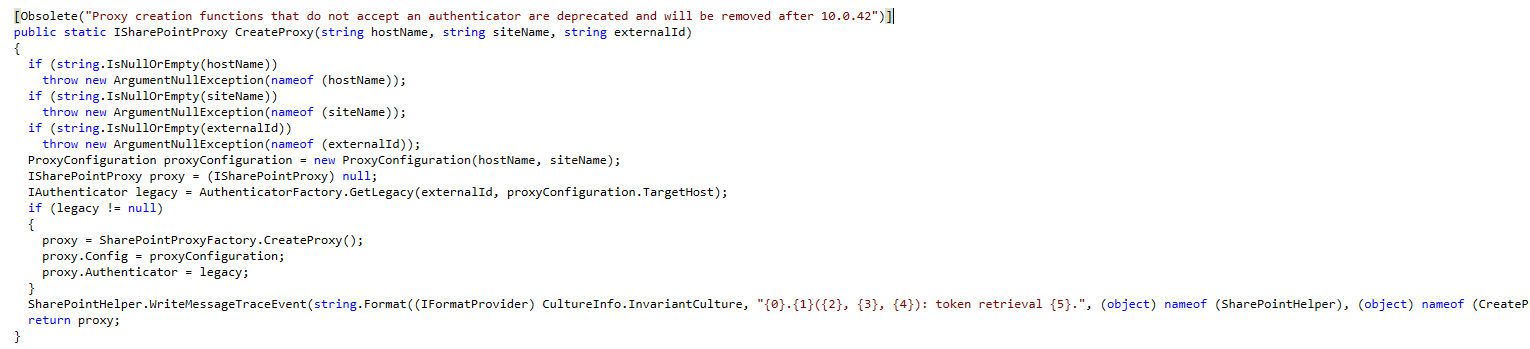
<p><img src="/img/posts/ISharePointProxy.png" alt="context helper" />
Decompilation of Microsoft.Dynamics.Platform.Integration.SharePoint.dll / SharePointHelper</p>
<ol>
  <li>
    <p><strong>Deprecation of Existing SharePoint Authentication</strong><br />
The authentication mechanism previously used for integrating with SharePoint is being removed. As of version 10.0.40, the new SharePoint user authentication feature is available but optional. However, it will become mandatory starting with version 10.0.42.</p>
  </li>
  <li>
    <p><strong>Migration Deadline</strong><br />
By <strong>February 28, 2025</strong>, you must migrate to the new SharePoint authentication model. After this date, the current SharePoint connection method will stop working entirely.</p>
  </li>
  <li>
    <p><strong>Impact on Token Generation via SharePoint Proxy</strong><br />
The <code>SharePointHelper::createProxy</code> method, which was previously used to obtain a SharePoint proxy with an access token, is now deprecated and marked for removal by version 10.0.42. Calling this method:</p>
    <pre><code class="language-xpp">SharePointHelper::createProxy(
    docuParameters.DefaultSharePointServer,
    '/',
    xUserInfo::getCurrentUserExternalId()
);
</code></pre>
    <p>will no longer return a proxy with an access token. Although the access token might still appear when debugging (via the <code>LegacyTokenAuthenticator</code>), this class is now internal, making it inaccessible for external use.</p>
  </li>
</ol>

<h2 id="one-time-registration-process">One Time registration process</h2>
<p>According to Microsoft, you should execute this script to allow application access to SharePoint after 10.0.40 for non interactive sessions.
<a href="https://learn.microsoft.com/en-us/dynamics365/fin-ops-core/dev-itpro/organization-administration/configure-document-management#one-time-registration-process">Microsoft Learn: Configure document management | One-time registration process</a></p>

<pre><code class="language-ps">Import-Module Microsoft.Graph
   
# The parameter for TenantId needs to be changed
Connect-MgGraph -TenantId microsoft.onmicrosoft.com -Scopes 'Application.ReadWrite.All'
    
# These AppIds do not change as they are the first party application IDs
$erpServicePrincipal = Get-MgServicePrincipal -Filter "AppId eq '00000015-0000-0000-c000-000000000000'"
$sharePointServicePrincipal = Get-MgServicePrincipal -Filter "AppId eq '00000003-0000-0ff1-ce00-000000000000'"
$spAppRole = $sharePointServicePrincipal.AppRoles | where {$_.Value -eq 'Sites.ReadWrite.All'}
    
# Assign the SharePoint 'Sites.ReadWrite.All' permission to the Microsoft Dynamics 365 finance and operations application
New-MgServicePrincipalAppRoleAssignedTo -ServicePrincipalId $erpServicePrincipal.Id -PrincipalId $erpServicePrincipal.Id -ResourceId $sharePointServicePrincipal.Id -AppRoleId $spAppRole.Id
</code></pre>

<h2 id="what-can-be-used-instead">What Can Be Used Instead?</h2>

<h3 id="temporary-solution-sharepointtokenfactory"><strong>Temporary Solution: SharePointTokenFactory</strong></h3>
<p>For those encountering <code>401 Unauthorized</code> errors in SharePoint API calls, the following method can be used to obtain an access token:</p>
<pre><code class="language-xpp">   using Microsoft.Dynamics.Platform.Integration.SharePoint;

   SharePointTokenFactory::GetToken(userId, domain);
</code></pre>
<p>This approach provides a bearer token that can authenticate SharePoint API requests. However, be cautious: while this method is currently not marked as deprecated, there’s no guarantee it will remain available in future updates. It is strongly recommended to monitor updates from Microsoft for any changes.</p>

<h3 id="long-term-solution-entra-id-app-registration"><strong>Long-Term Solution: Entra ID App Registration</strong></h3>
<p>To future-proof your integration, consider creating an app registration in <strong>Microsoft Entra ID</strong> (formerly Azure Active Directory). Using this approach, you can generate your own access tokens with either:</p>
<ul>
  <li>Client and secret authentication, or</li>
  <li>Certificate-based authentication.</li>
</ul>

<p>This ensures compliance with Microsoft’s recommended practices and prepares your system for any further changes in authentication models.</p>

<h2 id="next-steps">Next Steps</h2>

<ul>
  <li><strong>Audit Your Current Integrations:</strong> Check where <code>SharePointHelper::createProxy</code> or similar methods are being used and plan for their removal.</li>
  <li><strong>Implement Token Generation:</strong> Use <code>SharePointTokenFactory::GetToken</code> as a short-term workaround while transitioning to app registration.</li>
  <li><strong>Prepare for Mandatory Updates:</strong> Begin configuring app registrations in Entra ID to handle token-based authentication.</li>
</ul>

<p>The upcoming updates underscore the importance of aligning with Microsoft’s evolving security protocols. By taking proactive steps now, you can ensure uninterrupted integration with SharePoint and avoid disruptions when the current authentication model is retired.</p>

<h2 id="useful-resources">Useful Resources</h2>

<ul>
  <li><a href="https://learn.microsoft.com/en-us/azure/active-directory/develop/quickstart-register-app">Microsoft Documentation: Registering an App in Entra ID</a></li>
  <li><a href="https://learn.microsoft.com/en-us/dynamics365/fin-ops-core/fin-ops/get-started/removed-deprecated-features-platform-updates#sharepoint-integration-authentication-using-a-microsoft-managed-high-trust-connection">Dynamics 365 Finance and Operations Release Notes</a></li>
</ul>

<p><strong>Got questions or need further clarification?</strong> Drop a comment below</p>]]></content><author><name>Raphael Bucher</name></author><category term="X++" /><category term="X++" /><summary type="html"><![CDATA[With the release of Dynamics 365 Finance version 10.0.40, significant changes have been introduced to the SharePoint authentication mechanism. These updates will impact any integration with SharePoint that relies on the previous authentication model. If you use SharePoint APIs within Dynamics 365, you must prepare for these changes before they become mandatory with version 10.0.42. Here’s a breakdown of what you need to know.]]></summary></entry><entry><title type="html">Streamline Your Debugging: Simplifying Reattaching to w3wp.exe in Visual Studio for D365 Finance and Operation</title><link href="https://raphaelbucher.ch/x++/2024/10/28/streamline-debugging-reattaching-process-w3wp.html" rel="alternate" type="text/html" title="Streamline Your Debugging: Simplifying Reattaching to w3wp.exe in Visual Studio for D365 Finance and Operation" /><published>2024-10-28T00:00:00+00:00</published><updated>2024-10-28T00:00:00+00:00</updated><id>https://raphaelbucher.ch/x++/2024/10/28/streamline-debugging-reattaching-process-w3wp</id><content type="html" xml:base="https://raphaelbucher.ch/x++/2024/10/28/streamline-debugging-reattaching-process-w3wp.html"><![CDATA[<p>If you’re working with Dynamics 365 Finance &amp; Operations (D365 F&amp;O) in Visual Studio, you’ve likely encountered the frequent annoyance of reattaching to the correct <code>w3wp.exe</code> process. Every time you start debugging X++ code, you get prompted to select from multiple <code>w3wp</code> sub-processes, often with no clear indication of which one is actually handling the F&amp;O instance. This is time-consuming and frustrating, especially when you’re only interested in the main F&amp;O Application Object Server (AOS) instance.</p>

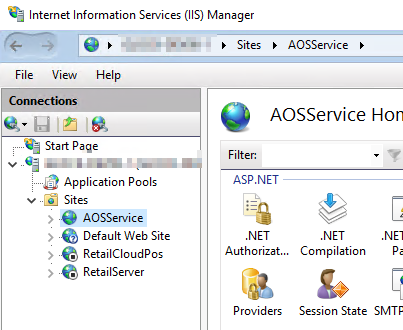
<p>A simple fix can make your debugging experience much smoother by disabling unnecessary sites in IIS. Here’s how to set it up so that only the AOSService process runs, eliminating the need to guess which <code>w3wp.exe</code> instance to reattach.</p>

<hr />

<h2 id="why-multiple-w3wpexe-processes-appear">Why Multiple <code>w3wp.exe</code> Processes Appear</h2>

<p>When you run D365 F&amp;O on your local machine, several IIS sites might be up by default:</p>
<ul>
  <li><strong>AOSService</strong>: The main D365 F&amp;O application service.</li>
  <li><strong>RetailServer</strong>: A retail component if your environment includes it.</li>
  <li><strong>RetailCloudPos</strong>: Another retail component related to Point of Sale.</li>
</ul>

<p>For many developers who aren’t working with retail functionality, only the <strong>AOSService</strong> process is needed for debugging. Yet Visual Studio will prompt you to choose among all these <code>w3wp</code> processes every time, adding unnecessary friction to the debugging process.</p>

<h2 id="disabling-unnecessary-iis-sites">Disabling Unnecessary IIS Sites</h2>

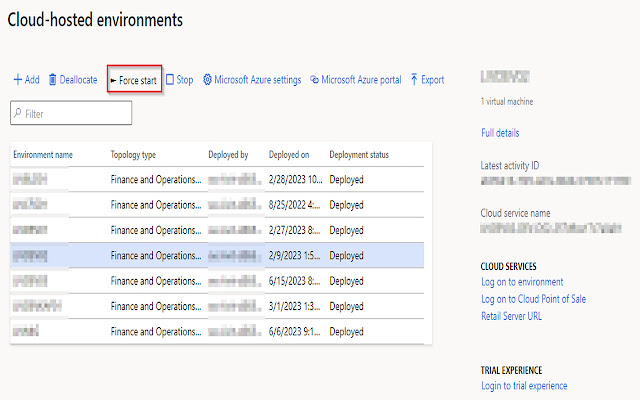
<p><img src="/img/posts/iis-disabled-sites.png" alt="context helper" /></p>

<p>To avoid being prompted, you can stop the retail-related sites under IIS Manager and keep only the AOSService site running. This way, only one <code>w3wp.exe</code> process will spin up when the application is running, and Visual Studio will no longer ask which process to attach to.</p>

<h3 id="steps-to-disable-unnecessary-sites">Steps to Disable Unnecessary Sites</h3>

<ol>
  <li><strong>Open IIS Manager</strong>:
    <ul>
      <li>Type “IIS Manager” in your Start Menu search and open it.</li>
    </ul>
  </li>
  <li><strong>Locate the Sites</strong>:
    <ul>
      <li>In the left-hand pane, expand your machine name, then click on “Sites” to view all the web applications hosted by IIS.</li>
    </ul>
  </li>
  <li><strong>Stop Unneeded Sites</strong>:
    <ul>
      <li>Right-click on <strong>RetailServer</strong> and <strong>RetailCloudPos</strong> and select “Stop” for each.</li>
      <li>Confirm that <strong>AOSService</strong> remains running.</li>
    </ul>
  </li>
  <li><strong>Recycle IIS</strong>:
    <ul>
      <li>Run the following command in Command Prompt (with administrator privileges) to recycle the IIS service:
        <pre><code class="language-shell">iisreset
</code></pre>
      </li>
    </ul>
  </li>
  <li><strong>Reattach to Debugging in Visual Studio</strong>:
    <ul>
      <li>Now, when you go to debug, Visual Studio will detect only the single AOSService process associated with D365 F&amp;O. No more guessing required!</li>
    </ul>
  </li>
</ol>

<hr />

<h2 id="benefits-of-this-approach">Benefits of This Approach</h2>

<ul>
  <li><strong>Saves Time</strong>: You eliminate the need to select the correct process every time, allowing for faster debugging starts.</li>
  <li><strong>Less Frustration</strong>: Without needing to scroll through a list of processes, you can focus on debugging and avoid trial and error.</li>
  <li><strong>Streamlined Workflow</strong>: This setup keeps your development environment lean, especially if you’re working in a non-retail environment.</li>
</ul>

<hr />

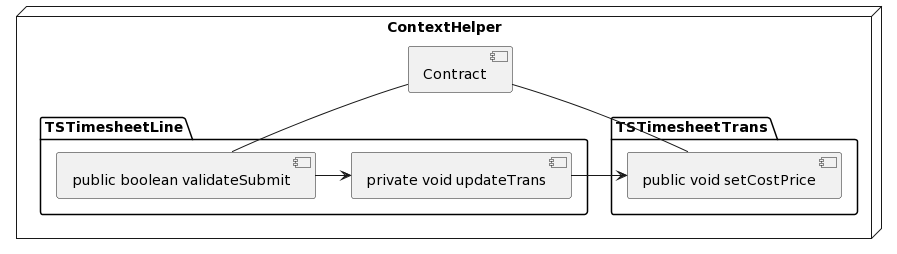
<p>By disabling the unused retail sites, you can streamline your Visual Studio debugging experience and keep your focus where it should be: on the code. Happy debugging!</p>]]></content><author><name>Raphael Bucher</name></author><category term="X++" /><category term="X++" /><summary type="html"><![CDATA[If you’re working with Dynamics 365 Finance &amp; Operations (D365 F&amp;O) in Visual Studio, you’ve likely encountered the frequent annoyance of reattaching to the correct w3wp.exe process. Every time you start debugging X++ code, you get prompted to select from multiple w3wp sub-processes, often with no clear indication of which one is actually handling the F&amp;O instance. This is time-consuming and frustrating, especially when you’re only interested in the main F&amp;O Application Object Server (AOS) instance.]]></summary></entry><entry><title type="html">Chain of Command - Contextual Helper Framework (Updated for 2024)</title><link href="https://raphaelbucher.ch/x++/2024/10/09/context-helper-updated.html" rel="alternate" type="text/html" title="Chain of Command - Contextual Helper Framework (Updated for 2024)" /><published>2024-10-09T00:00:00+00:00</published><updated>2024-10-09T00:00:00+00:00</updated><id>https://raphaelbucher.ch/x++/2024/10/09/context-helper-updated</id><content type="html" xml:base="https://raphaelbucher.ch/x++/2024/10/09/context-helper-updated.html"><![CDATA[<p><img src="/img/posts/contexthelper.png" alt="context helper" /></p>

<p>When extending Microsoft’s standard code in Dynamics 365, passing contextual data down the call stack can sometimes be a challenge. While Chain of Command (CoC) makes it possible to extend standard logic, there are cases where private or non-extensible methods interrupt the flow. Previously, the <strong>ContextHelper</strong> class provided a way to manage this (see previous blog post post: <a href="https://raphaelbucher.ch/x++/2023/04/24/context-helper.html">Chain of Command - contextual helper class</a>) but now I have create a more robust framework to replace it.</p>

<h3 id="introducing-the-new-context-helper-framework">Introducing the New Context Helper Framework</h3>

<p>This new framework consists of multiple classes designed to make managing contract instances easier, more flexible, and more scalable. By introducing a contract registry and factory, the framework handles the lifecycle of context objects automatically. Below are the key components of the framework:</p>

<h3 id="key-framework-classes">Key Framework Classes</h3>

<ol>
  <li><strong>ContextContractFactoryAttribute_BET</strong> - An attribute class that defines contract types.</li>
  <li><strong>ContextContractRegistry_BET</strong> - A singleton registry that manages contract instances.</li>
  <li><strong>ContextHelper_BET</strong> - The utility class used to create and retrieve contracts.</li>
  <li><strong>IContextContract_BET</strong> - The abstract contract class that implements disposable functionality for contract lifecycle management.</li>
</ol>

<h4 id="contextcontractfactoryattribute_bet">ContextContractFactoryAttribute_BET</h4>

<pre><code class="language-xpp">internal final class ContextContractFactoryAttribute_BET extends SysAttribute implements SysExtensionIAttribute
{
    private ClassName className;

    public void new(ClassName _className)
    {
        className = _className;
    }

    public str parmCacheKey()
    {
        return classStr(ContextContractFactoryAttribute_BET) + ';' + className;
    }

    public boolean useSingleton()
    {
        return false;
    }
}
</code></pre>

<h4 id="contextcontractregistry_bet">ContextContractRegistry_BET</h4>

<pre><code class="language-xpp">internal final class ContextContractRegistry_BET implements System.IDisposable
{
    private static ContextContractRegistry_BET instance;
    private Map instanceMap;

    private void init()
    {
        instanceMap = new Map(Types::Integer, Types::Class);
    }

    public static ContextContractRegistry_BET instance()
    {
        if (! instance)
        {
            instance = new ContextContractRegistry_BET();
            instance.init();
        }
        return instance;
    }

    internal void insert(IContextContract_BET _contract)
    {
        instanceMap.insert(classIdGet(_contract), _contract);
    }

    internal void remove(ClassId _classId)
    {
        instanceMap.remove(_classId);
    }

    internal boolean exists(ClassId _classId)
    {
        return instanceMap.exists(_classId);
    }

    internal IContextContract_BET lookup(ClassId _classId)
    {
        return instanceMap.lookup(_classId);
    }

    public void dispose()
    {
        if (instanceMap.empty())
        {
            instanceMap = null;
            instance = null;
        }
    }
}
</code></pre>

<h4 id="contexthelper_bet">ContextHelper_BET</h4>

<pre><code class="language-xpp">public static class ContextHelper_BET
{
    public static IContextContract_BET getContractInstance(ClassName _className)
    {
        IContextContract_BET contract;

        ClassId classId = className2Id(_className);

        ContextContractRegistry_BET registry = ContextContractRegistry_BET::instance();
        if (registry.exists(classId))
        {
            contract = registry.lookup(classId);
        }
        
        return contract;
    }

    public static IContextContract_BET createContractInstance(ClassName _className)
    {
        return SysExtensionAppClassFactory::getClassFromSysAttribute(
            classStr(IContextContract_BET),
            new ContextContractFactoryAttribute_BET(_className)
        ) as IContextContract_BET;
    }
}
</code></pre>

<h4 id="icontextcontract_bet">IContextContract_BET</h4>

<pre><code class="language-xpp">public abstract class IContextContract_BET implements System.IDisposable
{
    protected void new()
    {
        this.registry().insert(this);
    }

    public void dispose()
    {
        ClassId classId = classIdGet(this);

        if (this.registry().exists(classId))
        {
            this.registry().remove(classId);
        }

        this.registry().dispose();
    }

    private ContextContractRegistry_BET registry()
    {
        return ContextContractRegistry_BET::instance();
    }
}
</code></pre>

<h3 id="example-timesheet-cost-price-modification">Example: Timesheet Cost Price Modification</h3>

<p>Let’s now apply the new framework to the same timesheet cost price scenario. You want to extend the <code>TSTimesheetTrans.setCostPrice</code> method to allow zero cost price during a specific workflow.</p>

<h4 id="step-1-create-the-contract-class">Step 1: Create the Contract Class</h4>

<p>Define a contract class that will hold the custom context (e.g., whether to allow zero cost price):</p>

<pre><code class="language-xpp">[ContextContractFactoryAttribute_BET(classStr(TSTimesheetLineValidateSubmitContract_BET))]
final class TSTimesheetLineValidateSubmitContract_BET extends IContextContract_BET
{
    private boolean allowZeroCostPrice;

    public boolean parmAllowZeroCostPrice(boolean _allowZeroCostPrice = allowZeroCostPrice)
    {
        allowZeroCostPrice = _allowZeroCostPrice;
        return allowZeroCostPrice;
    }
}
</code></pre>

<h4 id="step-2-modify-the-validatesubmit-method">Step 2: Modify the <code>validateSubmit</code> Method</h4>

<p>Extend the <code>validateSubmit</code> method in <code>TSTimesheetLine</code> to use the new <strong>ContextHelper_BET</strong> framework:</p>

<pre><code class="language-xpp">[ExtensionOf(tableStr(TSTimesheetLine))]
final class TSTimesheetLine_Extension
{
    public boolean validateSubmit(boolean _showInfolog, boolean _deleteZeroHourLines)
    {
        boolean validateSubmit;

        using (TSTimesheetLineValidateSubmitContract_BET contract = ContextHelper_BET::createContractInstance(classStr(TSTimesheetLineValidateSubmitContract_BET)))
        {
            contract.parmAllowZeroCostPrice(true);

            validateSubmit = next validateSubmit(_showInfolog, _deleteZeroHourLines);
        }

        return validateSubmit;
    }
}
</code></pre>

<h4 id="step-3-modify-the-setcostprice-method">Step 3: Modify the <code>setCostPrice</code> Method</h4>

<p>Finally, extend the <code>setCostPrice</code> method in <code>TSTimesheetTrans</code> to check the contract and set the cost price to zero if applicable:</p>

<pre><code class="language-xpp">[ExtensionOf(tableStr(TSTimesheetTrans))]
final class TSTimesheetTransTable_Extension
{
    public void setCostPrice(TSTimesheetLine _timesheetLine)
    {
        boolean origCostPriceIsZero = this.CostPrice == 0;

        next setCostPrice(_timesheetLine);

        if (origCostPriceIsZero)
        {
            TSTimesheetLineValidateSubmitContract_BET contract = ContextHelper_BET::getContractInstance(classStr(TSTimesheetLineValidateSubmitContract_BET));

            if (contract &amp;&amp; contract.parmAllowZeroCostPrice())
            {
                this.CostPrice = 0;
            }
        }
    }
}
</code></pre>

<h3 id="summary">Summary</h3>

<p>The new <strong>ContextHelper_BET</strong> framework simplifies the handling of contextual data within Chain of Command scenarios by using a contract registry and a factory to manage the lifecycle of context objects. It is more flexible and scalable than the previous implementation, allowing you to easily extend methods while maintaining the integrity of the call stack.</p>

<p>This framework is ideal for complex extensions where non-extensible objects or methods interrupt the flow of contextual data. However, as always, use this approach judiciously to avoid unnecessary complexity in your codebase.</p>]]></content><author><name>Raphael Bucher</name></author><category term="X++" /><category term="X++" /><summary type="html"><![CDATA[]]></summary></entry><entry><title type="html">Replacing Deep Links with a LinkHandler Class in Dynamics 365</title><link href="https://raphaelbucher.ch/x++/2024/09/13/deeplink-alternative-linkhandler.html" rel="alternate" type="text/html" title="Replacing Deep Links with a LinkHandler Class in Dynamics 365" /><published>2024-09-13T00:00:00+00:00</published><updated>2024-09-13T00:00:00+00:00</updated><id>https://raphaelbucher.ch/x++/2024/09/13/deeplink-alternative-linkhandler</id><content type="html" xml:base="https://raphaelbucher.ch/x++/2024/09/13/deeplink-alternative-linkhandler.html"><![CDATA[<p>In Dynamics 365 development, deep links are often used to direct users to specific records within the system. However, deep links can be fragile, especially when the underlying data changes or when they include complex URL parameters. To address this, we can implement a <code>LinkHandler</code> class that processes URL parameters, searches for the specified record, and automatically redirects the user to the appropriate form.</p>

<p>In this post, I’ll walk through an example of how to replace deep links with a <code>LinkHandler</code> class.</p>

<h2 id="the-concept-behind-linkhandler">The Concept Behind LinkHandler</h2>

<p>The <code>LinkHandler</code> class serves as a more dynamic and maintainable alternative to deep links. It takes URL parameters—such as a table name and a search key—and attempts to locate the corresponding record. Once the record is found, it redirects the user to the relevant form.</p>

<p>This method is more flexible than traditional deep links because it decouples the URL structure from specific record identifiers, making the system more resilient to changes.</p>

<h3 id="key-features-of-the-linkhandler-approach">Key Features of the LinkHandler Approach</h3>

<ul>
  <li><strong>Dynamic Record Search</strong>: The handler uses the table name and search key passed in the URL to query for the correct record.</li>
  <li><strong>Error Handling</strong>: If no record is found, the user is alerted with a meaningful error message.</li>
  <li><strong>Automatic Redirection</strong>: Once the record is found, the handler redirects the user to the appropriate UI form.</li>
  <li><strong>Security Compliance</strong>: Before redirection, the handler ensures that the user has the necessary permissions to view the record.</li>
</ul>

<h3 id="building-the-url-for-the-linkhandler">Building the URL for the LinkHandler</h3>

<p>To use the <code>LinkHandler</code> class, you’ll need to construct the URL with the appropriate query parameters. Below is the template format and a real usage example. Note that an appropriate MenuItemAction should be created and secured through a priviliege.</p>

<h4 id="url-template">URL Template</h4>
<p><code>&amp;mi=action:LinkHandler&amp;tableName=[TableName]&amp;searchKey=[Field1:Value1];[Field2:Value2];[...]</code></p>
<ul>
  <li><code>tableName</code>: The name of the table you want to search.</li>
  <li><code>searchKey</code>: A semicolon-separated list of field-value pairs used to locate the record.</li>
</ul>

<h4 id="real-usage-example">Real Usage Example</h4>
<p><code>&amp;mi=action:LinkHandler&amp;tableName=ProjTable&amp;searchKey=ProjId:PRJ-000032</code></p>

<p>In this example, the <code>LinkHandler</code> searches the <code>ProjTable</code> for a record where the <code>ProjId</code> is <code>PRJ-000032</code>.</p>

<h2 id="code-example-linkhandler">Code Example: <code>LinkHandler</code></h2>

<p>Below is the X++ implementation of the <code>LinkHandler</code> class.</p>

<pre><code class="language-xpp">internal final class LinkHandler
{
    private TableName tableName;
    private container searchKey;
    private Common common;

    public static LinkHandler construct()
    {
        return new LinkHandler();
    }

    public static void main(Args _args)
    {
        var linkHandler = LinkHandler::construct();
        linkHandler.initFromUrl();
        linkHandler.redirect();
    }

    private void initFromUrl()
    {
        URLUtility urlUtility = new URLUtility();

        tableName = urlUtility.getQueryParamValue('tableName');
        searchKey = str2con(urlUtility.getQueryParamValue('searchKey'), ';');
    }

    private Common fetchRecord()
    {
        SysDictTable entityDictTable = SysDictTable::newName(tableName);
        common = entityDictTable.makeRecord();

        var searchObject = this.getSearchObject(common);
        var searchStatement = new SysDaSearchStatement();

        if (!searchStatement.findNext(searchObject))
        {
            throw error('No record found.');
        }

        return common;
    }

    private SysDaSearchObject getSearchObject(Common _common)
    {
        var queryObject = new SysDaQueryObject(_common);
        SysDaEqualsExpression equalsExpression;

        for (int i = 1; i &lt;= conLen(searchKey); i++)
        {
            str keyValue = conPeek(searchKey, 1);
            str fieldName, value;
            [fieldName, value] = str2con(keyValue, ':');

            SysDictField dictField = SysDictField::newName(tableId2Name(_common.TableId), fieldName);

            if (!dictField)
            {
                throw error(strFmt('Unknown field %1', fieldName));
            }

            anytype searchValue = this.getSearchFieldValue(value, dictField);

            if (!equalsExpression)
            {
                equalsExpression = new SysDaEqualsExpression(
                    new SysDaFieldExpression(_common, fieldName),
                    new SysDaValueExpression(searchValue)
                );
            }
            else
            {
                equalsExpression.and(
                    new SysDaEqualsExpression(
                        new SysDaFieldExpression(_common, fieldName),
                        new SysDaValueExpression(searchValue)
                    )
                );
            }
        }

        if (equalsExpression)
        {
            queryObject.whereClause(equalsExpression);
        }

        queryObject.firstOnlyHint = SysDaFirstOnlyHint::FirstOnly1;
        return new SysDaSearchObject(queryObject);
    }

    private anytype getSearchFieldValue(anytype _value, SysDictField _dictField)
    {
        Types type = _dictField.baseType();

        switch (type)
        {
            case Types::RString:
            case Types::VarString:
            case Types::String:
                return any2Str(_value);
            case Types::Integer:
                return any2Int(_value);
            case Types::Int64:
                return any2Int64(_value);
            case Types::Real:
                return any2Real(_value);
            case Types::Date:
                return any2Date(_value);
            case Types::Enum:
                return new SysDictEnum(_dictField.enumId()).name2Value(_value);
            case Types::Guid:
                return any2Guid(_value);
            case Types::UtcDateTime:
                return DateTimeUtil::parse(_value);
            default:
                throw error(strfmt("@SYS73815", type));
        }
        return null;
    }

    private void redirect()
    {
        SysDictTable entityDictTable = SysDictTable::newName(tableName);
        Common record = this.fetchRecord();

        var accessRights = SecurityRights::construct().tableAccessRight(entityDictTable.name(), record);

        if (accessRights == AccessRight::NoAccess)
        {
            throw error('Insufficient rights to access record');
        }

        Args args = new Args(entityDictTable.formRef());
        args.record(record);

        FormRun formRun = classfactory.formRunClass(args);
        formRun.init();
        formRun.run();
        formRun.detach();
    }
}
</code></pre>

<h3 id="optimizing-url-parameters-with-standardization">Optimizing URL Parameters with Standardization</h3>

<p>While the current <code>LinkHandler</code> URL structure works, we can take inspiration from the OData protocol to make the URL parameters more standardized and readable. By following a convention similar to OData query syntax, we can make the URLs more intuitive and easier to parse.</p>

<h4 id="odata-inspired-url-structure">OData-Inspired URL Structure</h4>

<p>In OData, query parameters are standardized, allowing for more flexibility and clarity when querying data. For instance, we can use parameter names like <code>$filter</code> to specify conditions in a consistent way. Here’s how we could apply this approach to our <code>LinkHandler</code> class:</p>

<h4 id="optimized-url-template">Optimized URL Template</h4>
<p><code>&amp;$table=TableName&amp;$filter=Field1 eq 'Value1' and Field2 eq 'Value2'</code></p>

<ul>
  <li><code>$table</code>: Specifies the table to search.</li>
  <li><code>$filter</code>: Defines the conditions for locating the record, similar to OData filters. Using <code>eq</code> (equals) allows for better clarity and alignment with standard query syntax.</li>
</ul>

<h4 id="real-usage-example-1">Real Usage Example</h4>
<p><code>&amp;$table=ProjTable&amp;$filter=ProjId eq 'PRJ-000032'</code></p>

<p>In this example, we search the <code>ProjTable</code> for a record where <code>ProjId</code> equals <code>PRJ-000032</code>. The use of <code>$filter</code> allows for potential expansion in the future, such as supporting other operators (<code>ne</code> for “not equal,” <code>gt</code> for “greater than,” etc.).</p>

<h4 id="benefits-of-standardization">Benefits of Standardization</h4>

<ol>
  <li><strong>Clarity</strong>: The URL becomes more readable and easier to understand for both developers and administrators.</li>
  <li><strong>Flexibility</strong>: By using a standardized format, we can expand the logic to support more complex queries in the future without breaking existing URLs.</li>
  <li><strong>Maintainability</strong>: Standardized URLs are easier to maintain as they follow a known convention, reducing the risk of errors.</li>
</ol>

<p>Standardizing the URL parameters not only aligns with best practices but also makes the solution scalable and easier to integrate with other parts of the system.
But since this was more of a proof of concept, I decided to just use an easier approach to implement the URL parameter handling.</p>]]></content><author><name>Raphael Bucher</name></author><category term="X++" /><category term="X++" /><summary type="html"><![CDATA[In Dynamics 365 development, deep links are often used to direct users to specific records within the system. However, deep links can be fragile, especially when the underlying data changes or when they include complex URL parameters. To address this, we can implement a LinkHandler class that processes URL parameters, searches for the specified record, and automatically redirects the user to the appropriate form.]]></summary></entry></feed>